WRITTEN BY
Yatsugi
CEO, San Technology, Inc.
TABLE OF CONTENTS
At first glance, the numbers didn't make sense.
The same EZ Sign product was receiving noticeably different ratings in Japan and the U.S. In the U.S., customers were generally satisfied. In Japan, however, we were seeing a surprising number of 1-star reviews.
What made this even more puzzling was that when we received returned products along with complaints that the device wasn't working, we often found that the products themselves were functioning normally.
So what was actually happening?
The more we investigated, the more we realized that the issue wasn't simply whether EZ Sign "worked" or "didn't work."
It was about the gap between what the technology requires and what customers naturally expect from a modern digital device.
The real challenge
The technology was working. But the experience wasn't always communicating clearly enough why EZ Sign needed to be used in a particular way.
That realization sent us back to the drawing board—not to redesign the core technology, but to rethink the entire user experience around it.
01
Why Are the Ratings So Different?
As of June 24, 2026, the difference was striking.
AMAZON U.S.
4C ★ 4.4
2C ★ 4.7
AMAZON JAPAN
4C ★ 3.7
2C ★ 4.3
Looking specifically at the 4-color model in Japan, approximately 70% of customers gave it 4 or 5 stars, while around 15% gave it just 1 star.
Why was there such a wide gap?
Our investigation pointed toward a fundamental difference between NFC E-Paper and the way people intuitively expect digital devices to behave.
With most modern electronics, you tap a button, the device responds immediately, and the process is largely automatic.
EZ Sign works differently.
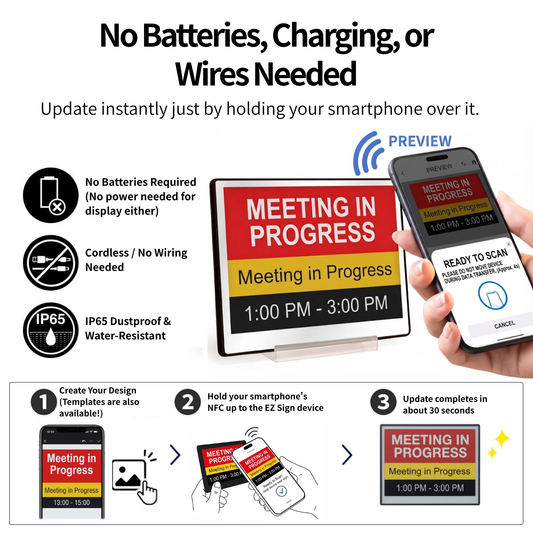
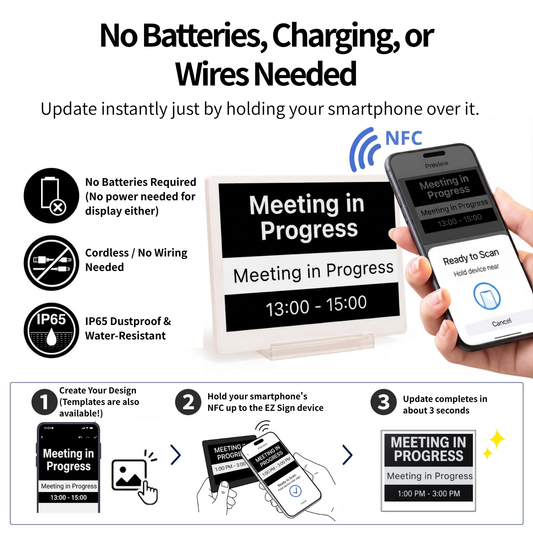
Because it has no battery, NFC is used not only to transfer data but also to supply the energy required to update the display. That makes the physical relationship between the smartphone and EZ Sign much more important than many users initially realize.
Same technology. Different expectations.
What looks like an "update error" to a customer can sometimes be the result of a physical interaction that was never clearly explained.
02
Four Physical Factors Behind NFC Update Problems
Once we started looking at the problem from the customer's perspective, four recurring physical factors became clear.

OBSTACLE 01
The NFC Antenna Position
NFC communication requires the smartphone and EZ Sign's antenna to be positioned correctly. If the phone is moved away from the appropriate location, the connection may become unstable.
OBSTACLE 02
The Camera Bump
Modern smartphones often have large camera modules that prevent the phone from sitting completely flat against the back of EZ Sign. That small physical gap can affect NFC communication.
OBSTACLE 03
Thick Cases and Magnets
Smartphone cases can add distance between the NFC antennas. Cases containing magnets or other components may also affect the interaction between the phone and EZ Sign.
OBSTACLE 04
The 25–30-Second Update
Updating the 4-color model takes roughly 25–30 seconds. During that time, the smartphone needs to remain in place until the display has finished updating.
It is a small difference—but a critical one.
A customer may naturally think, “The image appeared, so I can move my phone now.”
But for EZ Sign, the process isn't necessarily finished at that moment.
So please keep your smartphone in place until the app says the update is complete!
03
Turning Technical Characteristics into Better UX
Once we understood the problem, the answer wasn't simply to tell customers, “Use it correctly.”
If something repeatedly confuses users, the product experience needs to explain itself better.
That's why we began making a series of improvements designed to reduce uncertainty during setup and operation.
1
Clearer Product Information
We are making the Japanese product page clearer about how NFC works, what users should expect, and what to do if an update doesn't begin immediately.
2
The STOP Card
We introduced a simple STOP Card to make one critical instruction impossible to miss: once the update begins, keep the smartphone in place until the process is complete.
3
A Clearer NFC Position
For future production lots, we plan to print an NFC antenna position mark on the back of the device so users can more easily understand where to place their smartphone.
THE IMPORTANT PART
We don't just need to tell users what to do.
We need to explain why they need to do it.
That difference matters.
When users understand the reason behind a behavior, a technical limitation becomes part of the experience rather than a source of frustration.

04
Help Us Complete the “Magic”
EZ Sign has always been designed around a simple idea:
No batteries.
No charging.
No wires.
No charging.
No wires.
That simplicity is one of the most appealing aspects of E-Paper.
But every design choice comes with a trade-off.
Because EZ Sign does not have a battery, the NFC connection needs to provide both the power and the data required to update the display. That means the update process requires a little more physical stability and patience than people may expect from other digital devices.
STEP 01
Position your smartphone correctly.
STEP 02
Start the update.
STEP 03
Keep your smartphone still until the update is complete.
That's the small bit of patience required to get the benefit of a display that never needs charging.
We want the experience to feel effortless.
And that's exactly what we're working toward.
The goal isn't simply to reduce the number of 1-star reviews.
It's to make sure that when someone first picks up EZ Sign, they immediately understand how the product works—and why its unusual characteristics are actually what make it special.
We believe that closing that gap between technology and expectation is an essential part of product development.
NEXT EPISODE
The next challenge begins here.
Product development doesn't end when a product ships. Every customer interaction teaches us something new, and every lesson becomes part of the next version of EZ Sign.
05
Learn More About EZ Sign
Want to experience the technology for yourself?
Explore the EZ Sign lineup and discover how a battery-free E-Paper display can fit into everyday life, business environments, and much more.